
How to Build a Portfolio Website with Astro
A practical, end-to-end Astro tutorial — from project setup to Cloudflare deploy — using the real patterns that built this site, not theoretical best practices.
How to Build a Portfolio Website with AstroWhen I rebuilt this site recently, I had two competing instincts. One: reach for Next.js, the framework I know best. Two: pick the tool that disappears.
I picked Astro. What follows is the recipe — every pattern, every gotcha, every part most tutorials skip. This is exactly what’s running in production right now.
Why Astro for a portfolio#
Frameworks are opinions. Next.js’s default is “a React app that happens to render on a server.” Astro’s default is “a static HTML page that happens to ship a little JavaScript when you ask for it.”
Same code, opposite philosophies.
For a portfolio — mostly text, mostly read once, mostly never re-rendered — the second philosophy is closer to the truth. The page is a document, not an app.
What that earned me, concretely:
- 100/100 Lighthouse on Performance, Accessibility, Best Practices, and SEO
- Real-user LCP under 400ms across the world (measured via Cloudflare’s RUM, not lab simulation)
- Zero JavaScript shipped to most pages
- A codebase I can read end-to-end in an afternoon
If you’re building anything with auth, real-time data, or complex client state — stay on Next. For everything else, what follows is the build.
1. The setup#
npm create astro@latestThe interactive setup asks four questions. My answers:
- Where to create: a fresh directory
- How to start: empty (skip the templates — build from scratch, learn the conventions)
- Install dependencies: yes
- Use TypeScript: yes, strict
You end up with a minimal src/pages/index.astro and an astro.config.mjs. Five dependencies, total. Compare to a fresh Next install (~30+).
Add the integrations you’ll actually need:
npx astro add tailwind mdx sitemapThree commands and you have:
- Tailwind CSS for styling without leaving your markup
- MDX for content with embedded components
- Sitemap auto-generated at build time
2. The layout pattern#
The single most important file in any Astro site is your base layout — the wrapper every page passes its props through. Mine looks like this (trimmed):
---
// src/layouts/BaseLayout.astro
import "../styles/global.css";
import Nav from "../components/Nav.astro";
import Footer from "../components/Footer.astro";

interface Props {
  title?: string;
  description?: string;
  ogImage?: string;
  ogImageAlt?: string;
  ogType?: "website" | "article";
  noindex?: boolean;
}

const {
  title = "Your Name — Default Title",
  description = "Default site description.",
  ogImage = "/og.png",
  ogImageAlt = "Your Name",
  ogType = "website",
  noindex = false,
} = Astro.props;

const canonical = new URL(Astro.url.pathname, Astro.site);
const ogURL = new URL(ogImage, Astro.site);
---

<!doctype html>
<html lang="en-US">
  <head>
    <meta charset="UTF-8" />
    <meta name="viewport" content="width=device-width, initial-scale=1" />

    {noindex && <meta name="robots" content="noindex, follow" />}

    <title>{title}</title>
    <meta name="description" content={description} />
    <link rel="canonical" href={canonical} />

    <meta property="og:type" content={ogType} />
    <meta property="og:title" content={title} />
    <meta property="og:description" content={description} />
    <meta property="og:image" content={ogURL} />
    <meta property="og:image:alt" content={ogImageAlt} />
  </head>
  <body>
    <Nav />
    <main><slot /></main>
    <Footer />
  </body>
</html>
Every page wraps itself in this layout and passes its own metadata:
---
import BaseLayout from "../layouts/BaseLayout.astro";
---

<BaseLayout
  title="About — Your Name"
  description="A short introduction."
  ogImage="/og/about.png"
  ogImageAlt="About Your Name"
>
  <h1>About</h1>
  <!-- page content -->
</BaseLayout>
This single pattern handles canonical URLs, OG meta, page titles, and the global nav/footer. Write it once, every page benefits forever. Add a noindex prop for your 404 page so it stays out of search results.
3. Content as data#
Astro’s content collections turn src/content/* into a queryable, type-safe API. No more fs.readFile gymnastics, no more silently broken markdown.
Define the schema with Zod:
// src/content.config.ts
import { defineCollection, z } from "astro:content";
import { glob } from "astro/loaders";

const journal = defineCollection({
  loader: glob({ pattern: "**/*.{md,mdx}", base: "./src/content/journal" }),
  schema: z.object({
    title: z.string(),
    summary: z.string(),
    date: z.coerce.date(),
    updated: z.coerce.date().optional(),
    tags: z.array(z.string()).default([]),
    draft: z.boolean().default(false),
  }),
});

export const collections = { journal };
Now any post that’s missing title, has the wrong date format, or forgets a tag fails the build with a clear error. No more shipping broken posts.
Querying is one line:
---
import { getCollection } from "astro:content";

const posts = (await getCollection("journal", ({ data }) => !data.draft))
  .sort((a, b) => b.data.date.getTime() - a.data.date.getTime());
---

<ul>
  {posts.map(post => (
    <li>
      <a href={`/journal/${post.id}`}>{post.data.title}</a>
    </li>
  ))}
</ul>
The ({ data }) => !data.draft filter drops drafts from production. Set draft: true in any post’s frontmatter and it disappears from the build — but you can still preview it locally during dev.
There’s more to the schema side of this — date coercion, .optional() vs .default(), how a malformed post fails the build — in Astro Content Collections with Zod.
4. SEO without thinking about it#
Most portfolio tutorials wave their hands here. Don’t. SEO is the difference between a beautiful site nobody finds and a beautiful site that earns a steady trickle of inbound interest.
Canonical URLs#
Inside BaseLayout.astro, derive canonical from the request:
const canonical = new URL(Astro.url.pathname, Astro.site);Then emit it:
<link rel="canonical" href={canonical} />This single line prevents duplicate-content penalties when Google indexes both /about and /about/. Set trailingSlash: 'ignore' in astro.config.mjs and you’re done.
Sitemap with accurate lastmod#
Astro’s sitemap integration auto-generates the file. Tune it via serialize:
// astro.config.mjs
import sitemap from '@astrojs/sitemap';
import { readFileSync, readdirSync } from 'node:fs';

// Pre-fetch journal post dates so sitemap lastmod reflects the post's
// frontmatter date (canonical "when this changed") instead of the file
// mtime, which gets stomped by deploys, lockfile changes, and prettier.
const journalLastmod = new Map();
for (const file of readdirSync('./src/content/journal')) {
  if (!/\.(md|mdx)$/.test(file)) continue;
  const slug = file.replace(/\.(md|mdx)$/, '');
  const src = readFileSync(`./src/content/journal/${file}`, 'utf-8');
  const dateMatch = src.match(/^date:\s*['"]?([^'"\s]+)/m);
  if (dateMatch) {
    journalLastmod.set(slug, new Date(dateMatch[1]).toISOString());
  }
}

export default defineConfig({
  site: 'https://yoursite.com',
  trailingSlash: 'ignore',
  integrations: [
    sitemap({
      serialize(item) {
        const path = new URL(item.url).pathname.replace(/\/$/, "") || "/";
        if (path.startsWith("/journal/")) {
          const slug = path.replace(/^\/journal\//, "");
          const lm = journalLastmod.get(slug);
          if (lm) item.lastmod = lm;
        }
        return item;
      },
    }),
  ],
});
Honest caveat: Google has publicly stated that priority and changefreq are largely ignored. The signal that actually matters is lastmod. Wire it from frontmatter, as above.
JSON-LD structured data#
Schema.org JSON-LD tells Google your site has a real human behind it. The trick is to use a single @graph per page with stable @id URIs so Google deduplicates entities across pages:
// src/lib/seo.ts
const SITE = "https://yoursite.com";
const PERSON_ID = `${SITE}/#person`;
const WEBSITE_ID = `${SITE}/#website`;

const personNode = {
  "@type": "Person",
  "@id": PERSON_ID,
  name: "Your Name",
  url: SITE,
  jobTitle: "Software Engineer",
  sameAs: [
    "https://github.com/yourhandle",
    "https://twitter.com/yourhandle",
    "https://linkedin.com/in/yourhandle",
  ],
};

const websiteNode = {
  "@type": "WebSite",
  "@id": WEBSITE_ID,
  url: SITE,
  name: "Your Name",
  publisher: { "@id": PERSON_ID },
};

export const sitewideGraph = {
  "@context": "https://schema.org",
  "@graph": [websiteNode, personNode],
};
Drop it into <head>:
<script type="application/ld+json" is:inline set:html={JSON.stringify(sitewideGraph)} />For article pages, build a separate articleGraph that adds an Article node referencing the existing Person via @id. Google recognizes the relationship and your author identity carries between pages — exactly the signal that surfaces author cards in search results.
Open Graph + Twitter cards#
Inside BaseLayout, every page emits:
<meta property="og:type" content={ogType} />
<meta property="og:title" content={title} />
<meta property="og:description" content={description} />
<meta property="og:image" content={ogURL} />
<meta property="og:image:width" content="1200" />
<meta property="og:image:height" content="630" />
<meta property="og:image:alt" content={ogImageAlt} />

<meta name="twitter:card" content="summary_large_image" />
<meta name="twitter:image" content={ogURL} />
<meta name="twitter:image:alt" content={ogImageAlt} />
For article pages, also emit article:published_time, article:author, article:tag. LinkedIn, Slack, and Discord render richer cards when these are present.
One easy-to-miss detail: twitter:image:alt doesn’t fall back to og:image:alt. You have to emit both.
5. Per-page OG cards (the trick that won me Slack previews)#
The og:image per page is what people actually see when your URL gets pasted into Slack or LinkedIn. A generic site logo is forgettable. A custom card per page with the page’s own headline is the difference between “meh, scroll past” and “oh, I’ll click that.”
Satori renders JSX into SVG at build time. Pair it with Sharp for the PNG conversion:
// scripts/build-images.mjs
import satori from "satori";
import sharp from "sharp";
import { readFile, writeFile, readdir } from "node:fs/promises";

const fontData = await readFile(
  "./node_modules/@fontsource/noto-serif/files/noto-serif-latin-400-normal.woff"
);

function ogCard({ title, eyebrow }) {
  return {
    type: "div",
    props: {
      style: {
        width: "1200px", height: "630px",
        display: "flex", flexDirection: "column",
        justifyContent: "space-between",
        padding: "70px 80px",
        backgroundColor: "#0a0a0a", color: "#f3efe8",
        fontFamily: "Noto Serif",
      },
      children: [
        { type: "div", props: { style: { fontSize: "14px", letterSpacing: "0.22em", textTransform: "uppercase", color: "#a0a0a0" }, children: eyebrow } },
        { type: "div", props: { style: { fontSize: "78px", lineHeight: 1.05, maxWidth: "1040px" }, children: title } },
        { type: "div", props: { style: { fontSize: "16px", color: "#848484" }, children: "yoursite.com" } },
      ],
    },
  };
}

// Loop over your content collection
const journalDir = "./src/content/journal";
const files = (await readdir(journalDir)).filter(f => f.endsWith(".mdx"));

for (const file of files) {
  const raw = await readFile(`${journalDir}/${file}`, "utf-8");
  const titleMatch = raw.match(/^title:\s*"?([^"\n]+)/m);
  if (!titleMatch) continue;

  const slug = file.replace(/\.mdx$/, "");
  const svg = await satori(
    ogCard({ title: titleMatch[1], eyebrow: "Journal" }),
    { width: 1200, height: 630, fonts: [{ name: "Noto Serif", data: fontData, weight: 400, style: "normal" }] }
  );
  const png = await sharp(Buffer.from(svg)).png().toBuffer();
  await writeFile(`./public/og/${slug}.png`, png);
}
Wire it into prebuild so it runs automatically before every Astro build:
// package.json
{
  "scripts": {
    "prebuild": "node scripts/build-images.mjs",
    "build": "astro build"
  }
}
Now every post gets its own custom share card on every deploy. Add a new MDX file → next build mints the matching /og/[slug].png. No manual step.
There’s more to this one than fits here — font loading, the WebP-logo gotcha, the Satori CSS subset, debugging the SVG. I pulled it into its own piece: Generating Open Graph Images with Satori and Sharp.
6. Performance is the default, not the goal#
Astro ships zero JavaScript by default. So most of “performance optimization” is just not undoing that.
Self-host fonts#
Don’t load from fonts.googleapis.com. The cross-origin DNS+TLS round-trip costs ~200ms on first paint AND leaks visitor IP to Google. Use @fontsource:
npm i @fontsource/noto-serif @fontsource/instrument-sansImport the latin subsets you actually need from your global CSS:
/* src/styles/global.css */
@import "@fontsource/noto-serif/latin-400.css";
@import "@fontsource/noto-serif/latin-400-italic.css";
@import "@fontsource/instrument-sans/latin-400.css";
@import "@fontsource/instrument-sans/latin-500.css";
Vite bundles the woff2 files as same-origin hashed assets. font-display: swap is baked in — first paint never blocks on font load.
(Why this beats the Google Fonts <link> — the render round-trip, the IP leak, picking the right subsets — is its own short piece: Self-Hosting Fonts in Astro with Fontsource.)
Add interactivity sparingly#
When you need JavaScript, opt in per-component:
<MyCounter client:visible />The client:visible directive ships JS for that one component when it scrolls into view. Everything else stays static. The Astro team calls this islands architecture — interactive bits floating in a sea of HTML.
For my entire site, I have ~50 lines of vanilla JS handling the cursor-driven spotlight, mobile nav, scroll progress, and a contact dialog. No framework, no hydration, no bundle bloat.
7. Deploy on Cloudflare Pages#
git push origin mainThat’s the deploy, if you’ve connected the repo to Cloudflare Pages. The build runs on their CI:
- Build command:
npm run build - Output directory:
dist - Node version: 20+
Cloudflare’s edge network puts your assets within ~30ms of any user globally. Free tier covers personal sites comfortably.
For caching and security headers, drop a _headers file in /public/:
# Hashed assets — cache forever
/_astro/*
  Cache-Control: public, max-age=31536000, immutable

# OG cards + branding — also long-cache
/og/*
  Cache-Control: public, max-age=31536000, immutable

# HTML — short cache + security headers
/*
  Cache-Control: public, max-age=0, must-revalidate
  X-Content-Type-Options: nosniff
  Referrer-Policy: strict-origin-when-cross-origin
  Strict-Transport-Security: max-age=63072000; includeSubDomains; preload
  X-Frame-Options: DENY
  Cross-Origin-Opener-Policy: same-origin
Cloudflare reads it on every deploy and applies headers at the edge.
The full deploy story — Workers-with-static-assets vs classic Pages, wrangler.toml as the source of truth, the PUBLIC_ env-var gotcha, custom domains — is in Deploying an Astro Site to Cloudflare Pages.
8. The proof — Lighthouse 100 across the board#
Run PageSpeed Insights on the production URL and the lab report comes out perfect:
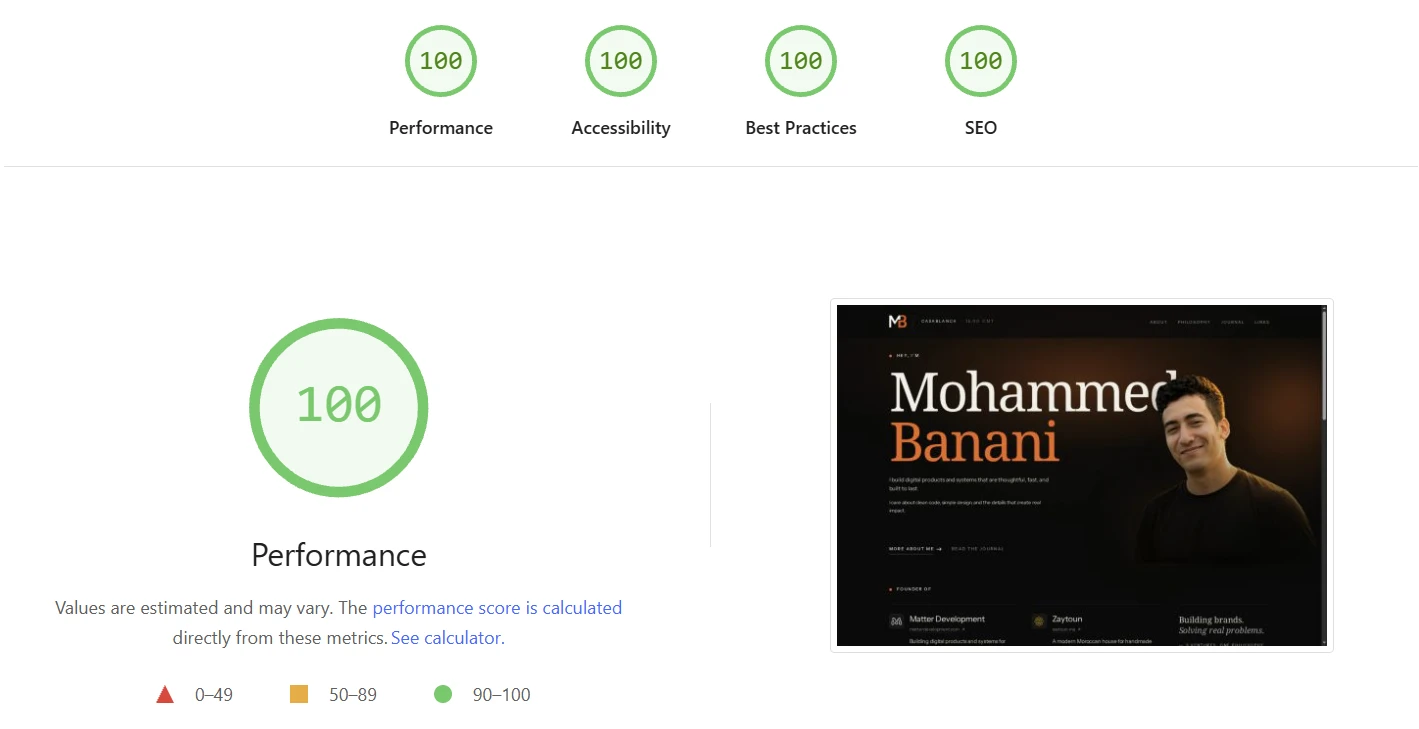
100 in all four categories: Performance, Accessibility, Best Practices, SEO. No tuning. No code-splitting babysitting. No clever loading strategies. The patterns above just produce this by default — that’s the entire point.
The metrics underneath:
- First Contentful Paint in 0.5s
- Largest Contentful Paint in 0.7s — well under Google’s 2,500ms “Good” threshold
- Cumulative Layout Shift: 0 — the page never reflows during load
- Total Blocking Time essentially zero — no framework runtime to block on
A caveat worth knowing. Lighthouse is a lab simulation — one synthetic test on one synthetic device with a simulated network. It tells you the page can be fast. The score Google’s ranking algorithm actually reads is the field data: real Core Web Vitals from real Chrome users (the Chrome User Experience Report). Lab scores are a useful proxy, not a substitute.
The good news: when lab scores are this clean, field numbers tend to follow. Mine do — measured via Cloudflare Web Analytics, my real-user P75 LCP sits under 400ms across the world, with 100% of measured visits landing in the “Good” bucket for all three Core Web Vitals.
That’s the whole payoff. Ship static HTML, no framework runtime, and these numbers happen by default.
9. What to skip until you actually need it#
A few things people add by default that you almost certainly don’t need on day one:
- Google Analytics: heavy, leaky. Use Cloudflare Web Analytics — free, privacy-friendly, included with Pages, ~3KB beacon vs GA’s ~50KB.
- A CMS: write MDX directly until you hit ~30 posts. Then evaluate TinaCMS or Decap.
- Image optimization service: Astro’s
<Image />component handles 90% of cases. - Session recording tools: Microsoft Clarity is great but adds ~1 second of Total Blocking Time. Only worth it for high-traffic UX research.
- Heavy framework integrations (React, Vue, Svelte): only add them when a specific component needs interactivity that vanilla JS can’t handle in 30 lines.
What you end up with#
A site that:
- Scores 100 on Lighthouse for Performance, Accessibility, Best Practices, and SEO
- Ships zero JavaScript to most pages, ~5KB on pages that need a sprinkle
- Has real-user LCP under 500ms worldwide
- Auto-generates SEO meta + OG cards + sitemap + RSS on every deploy
- Costs $0/month to host
The right framework isn’t the most powerful one. It’s the one that disappears.
If any of this resonates, start an Astro project, copy the patterns above, and ship something. The rest of the React ecosystem will still be there if you change your mind — but most of the time, you won’t need to.